
At work, I built an AI assistant that uses tools: it searches records, looks up details and drafts letters. Users liked it and kept one conversation going for a long time.
Then a long chat stopped working. Every message failed with the prompt is too long, even short questions and retries.
The chat was not broken, it was too big for the model to read. Here is how I solved it.
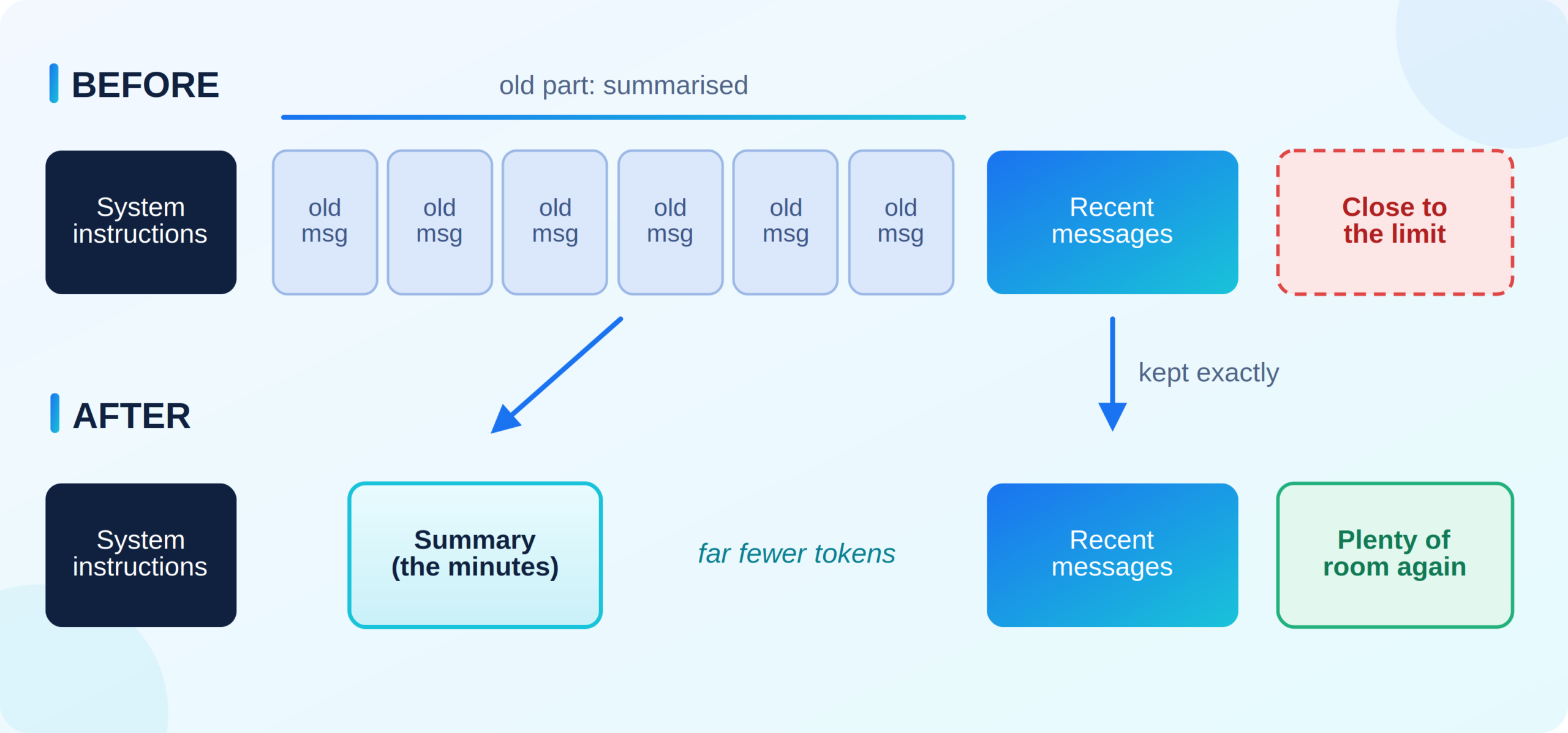
The idea in one picture: old messages become a short summary, and recent messages stay as they are.
1.Why a chat becomes full
An AI model remembers nothing between messages. On every message, your app sends the complete conversation again: instructions, old messages, tool results and the new message.
A model can read only a limited amount at once, called the context window, measured in tokens (small pieces of words).
So the conversation grows every turn, fastest with tool results, since one document can be thousands of tokens. For example:
| Turn | Size sent to the model | |
| 1 |
3,000 tokens
|
Fine |
| 10 |
45,000 tokens
|
Slower and more expensive |
| 20 |
120,000 tokens
|
Close to the limit |
| 21 |
135,000 tokens
|
Rejected: too big |
It never shrinks by itself. Turn 22 sends the same history plus one message, so the user is stuck.
Why not simply delete the oldest messages?
2.The idea: minutes of a meeting
When a colleague joins a meeting late, nobody replays the recording. He gets the minutes and follows the current discussion.
Compaction works the same way:
The model reads much less but keeps what matters. This runs before every message:
Each step has one rule, explained below.
Rule 1:Use the real size, do not guess
I first tried counting tokens myself. It is harder than it looks: each model family splits text differently, languages other than English count very differently, and some inputs, like tool descriptions, are not in your message list at all.
The model already reports the exact number in every response: tokens in and tokens out. Save it after each turn and check it before the next:
Two points:
-
Count input and output. The answer becomes the next turn’s input, so counting only input gives a number that is too low.
-
Why 80%? The number is from the previous turn. The remaining 20% leaves space for the new message and any large tool results.
The summary call also reports its token count. I saved it in the same place as the chat’s count, so the next turn saw a huge chat and compacted again, and again.
Rule 2:Never separate a tool call from its result
A tool use is stored as a pair, the call and its result:
Models expect each result right after its call. If your cut keeps the result but drops the call, the model rejects the conversation, and since that state is saved, every later message fails too.
The fix: start the recent part with a user message. A user message never sits between a call and its result, so cutting before one is always safe.
Also keep out of the old part: system instructions (rebuilt every turn) and old summaries (see Rule 3).
I once protected some important tool results from compaction. Since the old part always starts at the beginning of the chat, one protected message near the top blocked the cut forever, and the chat grew until it crashed.
Rule 3:Write a useful summary
Three things helped most.
Use a separate, plain model call
Do not ask the main assistant to summarise inside the chat: it may call a tool instead, and its reply becomes an odd extra message. Use a separate call with no tools and temperature 0 for stable output.
Ask for notes with fixed sections, not a paragraph
A paragraph summary slowly loses details. Ask for fixed sections:
| Section | What goes in it |
| Goal | What the user is trying to do |
| Open tasks | Things still waiting to be done |
| Done | Things already finished, so the assistant does not repeat them |
| Preferences | Tone, language, deadlines, things to avoid |
| IDs | Order numbers, record IDs, references, copied exactly. One wrong character breaks the next tool call |
| Notes | Anything else, in two or three sentences |
Update the old notes instead of summarising them again
On later compactions, send the previous summary plus the newly old messages and ask for one updated set of notes. Summarising summaries loses detail each time, like a photocopy of a photocopy.
Models sometimes return nearly correct output, such as extra text or a list instead of text. Repair what you can and fall back to plain notes rather than discarding it. In my first real test, a very good summary (3,682 tokens down to 725) was rejected only because one ID came back as a list.
Rule 4:Check the summary before you delete anything
Deletion cannot be undone, so I run two checks first:
If a check fails, the chat stays as it is for one more turn. Nothing is lost.
A third check required every string that looked like an ID to appear in the summary. It also caught random text that only looked like IDs, which the model never copied. Every summary was rejected, nothing was compacted, and the chat crashed.
Rule 5:Swap correctly (the LangGraph part)
This part needs real code. In LangGraph, the saved message list only grows: anything you write is appended. Saving a shorter list changes nothing, and saving only the summary makes the chat bigger.
To delete, you send LangGraph a special RemoveMessage for each old message, together with the new summary, in one update:
Two points:
-
Tag the summary (the
is_summaryflag above) so you can find it later. Then remove every old summary each time, not just the last one. If a past run failed halfway, the next one cleans it up. -
Do not write “the messages below” in the summary. LangGraph appends it at the end, so avoid referring to its position.
Rule 6:Keep a backup plan
Rule 1 has a weakness: when a turn is too big, the model returns an error with no size number, so the check never runs. One huge tool result can also cross the limit in a single turn.
So catch the “too long” error and recover once:
-
Compact hard, but follow Rule 2. Keep only the latest user message and everything after it. Never keep just the newest message: in a failing turn it is often a tool result, and without its call the chat breaks permanently.
-
Detect the error by its text. Providers word it differently (“maximum context length”, “prompt is too long”), so match a few specific phrases. A broad word like “context” can match unrelated errors.
-
Retry only once. If hard compaction fails, the cause is something it cannot shrink, like very long instructions. Tell the user clearly instead of letting them retry forever.
The most important point: never break the user’s chat
Compaction is a background task, and the user came for an answer. If anything fails (summary timeout, slow database, a bug in the cut), log it and continue with the chat unchanged:
Related habits:
-
Check first, delete last.
-
Put compaction behind an on and off switch to enable it gradually and disable it quickly.
-
Log every attempt with its result and the size before and after. Many rejections mean weak summaries, not broken compaction.
-
Keep the full original messages in your database. Compaction only changes what the model reads.
Checklist
Final thoughts
“Just summarise the old messages” sounded easy, and the summary really was the easy part. The real work was in the details: when to compact, where to cut, how to swap, and what to do when it fails.
If your users keep long conversations, I hope these notes save you some debugging time.